


When to add an inventory app to Xero
Adding an inventory app is a cost and a change, and plenty of businesses on Xero don't need one. This guide sets out how to tell whether yours does, what the different kinds of app are built for, and what to ask before committing to any of them.

The question is rarely whether Xero can do inventory. It keeps a financial record of stock and does that well. The question is whether the operation has started to need a second record, one that moves when goods arrive and orders ship rather than when bills and invoices are entered, and if it has, which kind of system should hold it.
The main guide covers where base Xero inventory stops. Xero inventory vs operational inventory works through why the two records diverge. This page is about the decision.
What adding an app costs
A second system means a subscription, an implementation, and a period where the team is learning something new while still running the business. It means an integration to understand: what posts to Xero, when, and what to do when a document lands wrong. It means a change to the accounting workflow, because the way stock value and cost of sales reach the ledger changes, and how it changes depends on the app. And it means a second place where product data has to be right.
None of that is a reason to stay on base Xero if the operation has outgrown it. It is a reason not to add a system on the strength of a feature list, or because of one bad stock figure. A common reason an app disappoints is that it was added to a process that was still changing shape.
Three tests before you look at any app
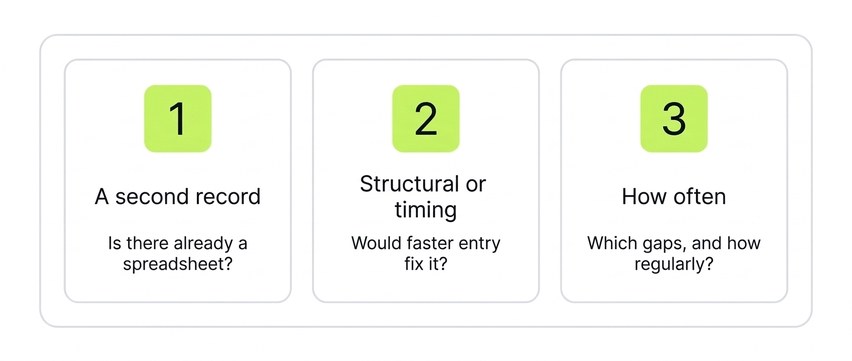
1. Is there already a second record? If someone maintains a stock spreadsheet and the team trusts it more than Xero, the business is already running two records. One of them is maintained by hand, and the question is only whether to keep doing it that way. The absence of a spreadsheet is weaker evidence the other way: the second record may be a whiteboard, a person's memory, or a workaround somewhere else.
2. Is the gap structural or a matter of timing? Some of what looks like a Xero limitation is bills and invoices being entered days after the goods moved. Where the accounting process allows it, shorten that lag for a month: enter bills as soon as they arrive, raise invoices as soon as the order has shipped. Don't create documents on dates the accounts don't support; the point is to remove avoidable delay, not to change when revenue or cost is recognised. If the stock figure becomes usable, the problem was timing. If it doesn't, because orders part-ship, or stock sits in two places, or components are consumed before anything is invoiced, the gap is structural.
3. Which of the six areas, and how often? The main guide sets out six areas where base Xero inventory is thinnest: availability, partial dispatch, back orders, goods-in, multi-location and assemblies. Xero covers parts of some of them; it shows quantities on order and committed in quotes, and it handles backorders through the invoice. The question is whether what it covers is enough for how the business runs. A business that hits one of them occasionally can usually work round it. A business that hits several of them regularly has a stock process that Xero was not built to run, and the workaround has become someone's job.
If the answers are "yes, there's a spreadsheet", "structural" and "several, regularly", the case for a second record is strong. What follows is about which kind.
What "inventory app" covers
The apps that connect to Xero are not one category. They were built for different operations, and the fit depends more on which operation yours resembles than on any individual feature. Broadly, they fall into a few kinds, and most products overlap more than one.
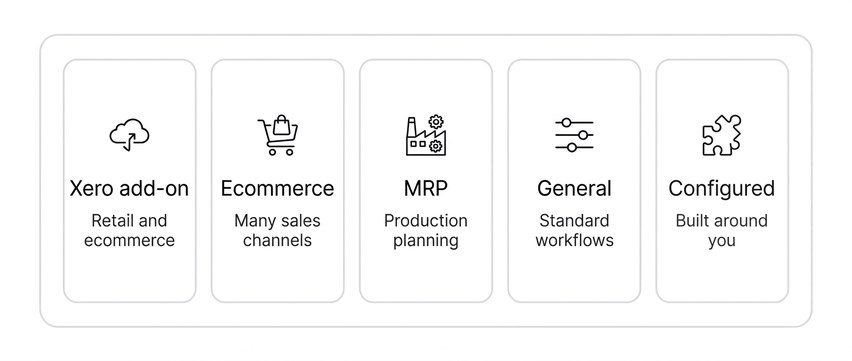
Xero's own add-on. Xero offers its own inventory product in some markets. It is an operational record, with sales orders, purchase-order receiving and locations, aimed mainly at ecommerce and retail. Where it's available and the operation fits that shape, it is the natural first thing to evaluate. The main guide has a note on it.
Ecommerce and multichannel apps. Built around webstores and marketplaces: stock synced across channels, orders pulled in from each, shipping labels, returns. Strong for a business that sells finished goods online through several storefronts. They tend to be thinner on B2B pricing, production, and orders that don't arrive through a sales channel.
Manufacturing and MRP apps. Built around bills of materials, work orders, routings and shop-floor scheduling, for a business whose main problem is production planning. Often more than a business needs if what it does is kit, bundle or assemble finished goods from a short list of components.
General inventory apps. A standard set of workflows for sales orders, purchasing, stock and warehouse, configured by the customer from a settings screen. Broad coverage, and often the quickest to switch on. The fit depends on the business being willing to run its process the way the app expects; where a process doesn't match, the workaround reappears, in a new place.
Configured operational platforms. Similar scope to a general inventory app, often wider, with light production and integrations such as EDI, but set up around the business by the vendor rather than by the customer, with forms, fields and reports built to how the business already works. More effort and cost up front, and an implementation run by the vendor's team. Suited to businesses whose process doesn't fit a template and isn't going to be changed to fit one. Workhorse is in this category.
The first three kinds are defined by what the software does; the last two are defined as much by how they are set up. Self-serve or vendor-configured is a second dimension of the choice that cuts across the functional categories, and some products offer both. There is no ranking here.
Matching the operation to the category
The shape of the operation narrows the category before any feature comparison does.
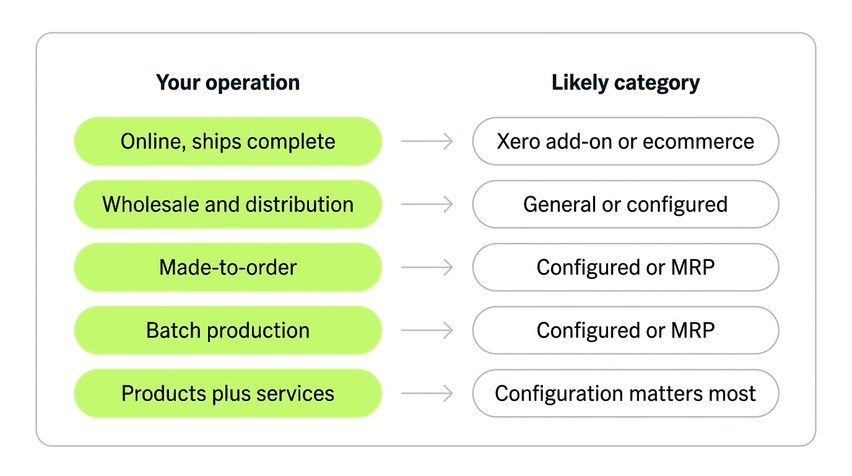
- A business selling finished goods through a webstore and a marketplace, from one location, with orders that ship complete: Xero's own add-on where available, or an ecommerce app.
- A wholesaler or distributor taking orders by email, phone and EDI, with customer-specific pricing, part-shipments and back orders: a general inventory app if the process is standard, a configured platform if it isn't.
- A made-to-order manufacturer quoting bespoke work and tracking each job through to dispatch: a configured platform, or an MRP app if scheduling the shop floor is the main problem.
- A batch producer consuming ingredients or components, tracking batches and expiry, and needing traceability back to supplier: a configured platform with batch control, or an MRP app for heavier production.
- A business combining products with hire, repairs or services: the combination is what standard workflows tend not to cover, so configuration is likely to matter more than category.
Two rules of thumb. If the operation is one of the standard shapes and can stay that way, a standard app is often cheaper and faster to put in. If the reason a spreadsheet exists is that the business does something the standard shapes don't cover, a standard app can leave the spreadsheet in place, attached to a different system.
What to ask any vendor
These apply to every category, and the answers separate a fit from a feature list.
- What moves stock in your system: the operational event, or the financial document? If a delivery isn't in stock until a bill exists, the stock-movement trigger is the same as base Xero's, whatever else the app does.
- Which system is the stock record, yours or Xero? If both hold a quantity, how are they kept from disagreeing?
- What posts to Xero, and when? Invoices, credit notes, bills, purchase orders; on approval, on dispatch, overnight.
- How do stock value and cost of sales reach the ledger, and what does the accountant do at month-end that they didn't before?
- Can an order part-ship and part-invoice, with the balance held as a back order the system tracks?
- Can a purchase order be received in part, on the day it arrives, before the bill?
- Can stock be held and moved between locations, and does availability show per location?
- If the business makes what it sells, are components consumed and finished goods created, and at what level of production?
- Who configures it, and what happens when the process changes after go-live?
- What does the implementation involve, how long does it take, and who does the work?
A vendor in any category should be able to answer all ten plainly. The ones that matter most for your business are the ones tied to the gaps you identified above.
When to wait
There are three situations where the right decision is not yet.
The process is still changing. A business that has just added a second product line, opened a second site or started selling to trade has a stock process that will look different before long. Configuring a system around a process that is about to change means configuring it twice.
The volume doesn't justify it. At low order volumes a spreadsheet can be adequate, provided the stock isn't high-value, batch- or serial-tracked, or relied on by several people at once. When keeping the spreadsheet right has become a regular part of someone's job, the volume has caught up.
The gap is one of timing. If the second test above hasn't been tried, try it first. It costs nothing but attention, and it settles the question.
Where Workhorse sits

Workhorse is a configured operational platform for product businesses on Xero: sales orders, allocation and free-to-sell, goods-in and part-receipts, multiple locations, batch and serial tracking, and components through light production, set up around the business by our team. It is not built for simple ecommerce selling finished goods from one place; Xero's own add-on and the ecommerce apps are built for that business and are the ones to evaluate first. The main guide covers how the switch runs and how Workhorse syncs to Xero.
See your invoices land in Xero
Book a discovery call and we'll run an order through Workhorse, from entry to the invoice arriving in Xero, coded and ready to reconcile.