


Xero inventory vs operational inventory: two records of the same stock
Xero keeps a financial record of stock. Many operations need a different one. This guide sets out what each record contains, why the two diverge and when that matters, and what happens when a business runs both.

When someone says "Xero inventory", they mean one specific thing: an item set up as tracked in Products & services, with a quantity on hand and a value. When an operations manager says "inventory", they mean something else: what is on the shelf, what has been promised, what is arriving, what is at the other site, and what can be sold today.
They describe the same physical stock and they are often different numbers, because they are built from different events and answer different questions. The main guide covers where this leads for a business on Xero. This page goes into the distinction itself.
What Xero's stock record contains
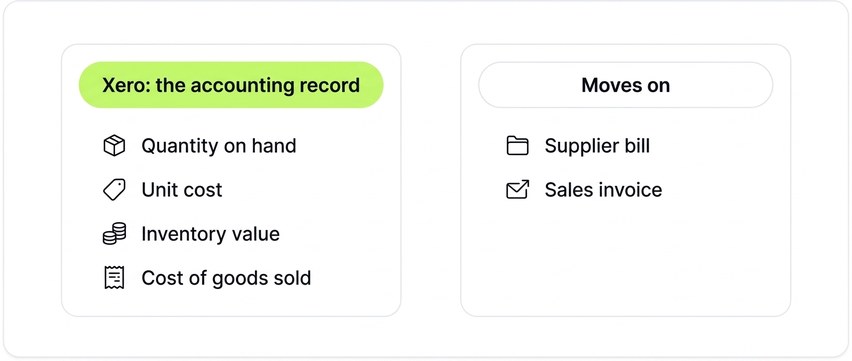
For a tracked item, Xero holds:
- A quantity on hand, and with backorders in use, what is available and what is owed.
- A unit cost, calculated as a weighted average of what has been paid for the item.
- The resulting inventory value, posted to an inventory asset account on the balance sheet.
- Cost of goods sold, posted out of inventory and into the profit and loss when the item is invoiced.
Quantity goes up when a supplier's bill is entered against the item, and down when a sales invoice is raised for it. Purchase orders and quotes do not change the quantity.
The record covers finished goods that are bought and sold as they are. It has no components, no locations and no batches. That is what the record holds, and for its purpose it works: Xero maintains the inventory asset and cost of sales from tracked-item transactions, and margin reporting follows without anyone calculating cost by hand.
This record is used at month-end, at year-end, and whenever someone needs to know what the stock is worth or what a line earned.
What an operational stock record contains
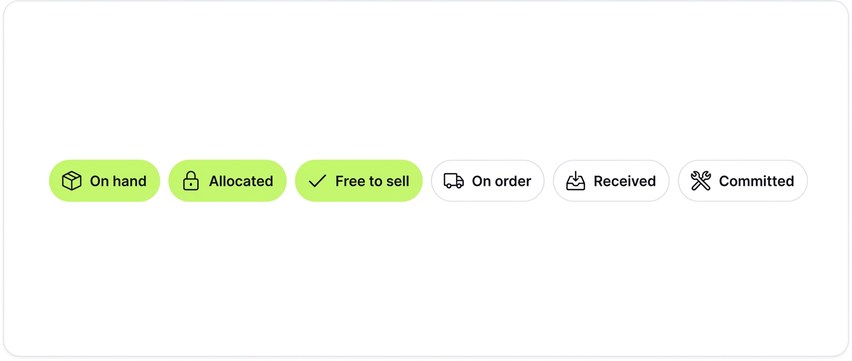
The operation needs to answer a different set of questions, and answering them takes more than the accounting record holds. An operational record holds stock in states:
- On hand. Physically present.
- Allocated. On hand but promised to an open order, so it cannot be sold again.
- Free to sell. On hand less allocated. This is the number a customer can be promised.
- On order. Raised on a purchase order and expected, with a date.
- Received, not yet billed. Physically arrived, checked in, and available, before the supplier's bill has been entered.
- Committed to production. Components reserved for a build that hasn't happened yet.
Each of these can be held by location, and where it matters, by batch, serial number or expiry date.
This record is used every time an order is taken, a delivery arrives, a pick list is printed or a purchase order is raised. It changes many times a day, and it changes when the operational event happens rather than when the paperwork is entered.
Four reasons the two records diverge
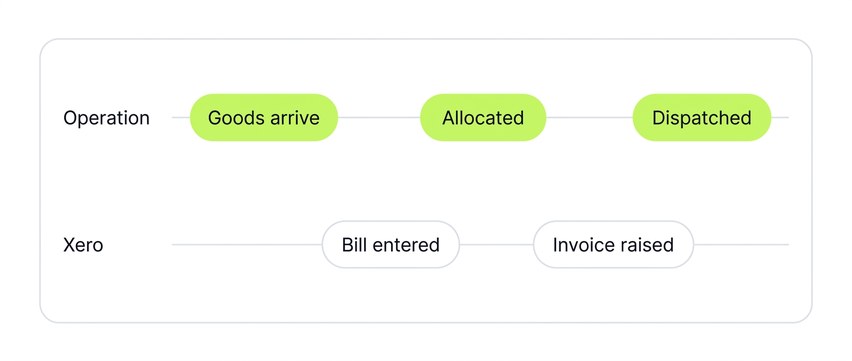
The main guide describes the mechanism behind the gaps in base Xero inventory: stock moves on financial events. That is the first reason the records diverge. There are three more.
1. The event that moves stock. In Xero, a bill and an invoice. In the operation, a delivery and a dispatch. A pallet that arrived at eight this morning is on the warehouse floor and in the operational record. It reaches Xero when the bill is entered, which may be the same afternoon or the end of the month.
2. Granularity. Xero holds the quantities listed above. The operation holds more states of the same item. Fifty on hand with forty allocated to open orders is ten free to sell; Xero doesn't see the allocation until those orders are invoiced.
3. Scope. Xero's record stops at the finished-goods line. A business that assembles, kits or blends what it sells has stock below that line, in components and work in progress, that Xero has no item type for. A radio assembler with a hundred housings and no circuit boards has, in operational terms, no radios it can build. In Xero it has a hundred housings.
4. Purpose. Xero's record exists to keep the accounts. Its movements are driven by accounting transactions, and it states a value at a date. The operational record exists so that a decision can be made now: accept this order, promise this date, raise this purchase order, move this stock. Its movements are driven by events: allocation, receipt, dispatch.
None of these is a fault in Xero. A record kept for the balance sheet moves on bills and invoices, holds a valued quantity, and stops at finished goods.
One order, followed through both records
A wholesaler holds 10 cases of a product at the start of the week, with a supplier delivery due. Here is the week, seen from both records.
| When | What happened | Operational record | Xero |
|---|---|---|---|
| Monday | Purchase order raised for 100 cases | On hand 10, on order 100, free to sell 10 | 10 |
| Tuesday | Customer orders 100 cases. 10 allocated from stock; 90 waiting on the purchase order. | On hand 10, allocated 10, free to sell 0, on order 100 | 10 |
| Wednesday | Supplier delivers 50 of the 100. Checked in. Bill not yet entered. | On hand 60, allocated 60, free to sell 0, on order 50 | 10 |
| Friday | 60 cases dispatched; 40 on back order until the rest of the delivery arrives | On hand 0, on order 50, back order 40 | 10 |
| Friday | Supplier bill entered for the 50 received | Unchanged | 60 |
| Tuesday | Invoice raised for the 60 dispatched | Unchanged | 0 |
Between Wednesday and Friday, Xero shows 10 cases while 60 are on the shelf, all of them promised. From Friday evening to the following Tuesday it shows 60 while the shelf is empty. At each point Xero's figure is the one implied by the bills and invoices entered so far. At each point the operational figure follows the delivery and the dispatch.
Someone quoting from Xero on Wednesday would offer 10 cases that were already allocated. Quoting from it the following Monday morning, they would offer 60 that had left the building. Xero is being asked a question it doesn't hold the answer to.
If the customer had been invoiced on Tuesday rather than on dispatch, Xero with backorders would show 10 consumed and 90 on backorder from that day. It would still not show the Wednesday delivery until the bill was entered, or the Friday dispatch at all.
This is the pattern a stock spreadsheet is usually built to correct. The spreadsheet is the operational record, maintained by hand.
What Xero has added, and what it changes
Two developments are relevant, and they are different in kind.
Backorders in base Xero. Xero has introduced backorders on tracked items: an invoice for more than is in stock can be approved, available stock is consumed, and the shortfall is held until more arrives. That closes part of the granularity gap above. It doesn't add allocation against orders that haven't been invoiced, quantities on order, receipt ahead of the bill, or locations, and the invoice is still the document that moves stock. On the purchasing side, a purchase order can be billed in stages, with a bill for what has arrived and the balance left open on the order. That records the arrival through the bill; it isn't a goods receipt.
Xero Inventory Plus. Xero's own inventory add-on, offered in some markets, is a different thing. It is an operational record: purchase orders are received on the order, in full or in part, and receiving adds the quantity to stock; sales orders are fulfilled and shipped; stock is held by location. Its accounting still runs through Xero. Receiving a purchase order and billing it are separate steps, and only the bill reaches the ledger; sales reach Xero as invoices where a balance is owed, and otherwise through journals. Even inside Xero's own product, the operational event and the accounting document are separate. Xero's answer to the operational questions is a second record alongside the accounting one, kept in step by documents. That is the same structure as any other operational system on Xero, and the rest of this page applies to it in the same way.
Running both records
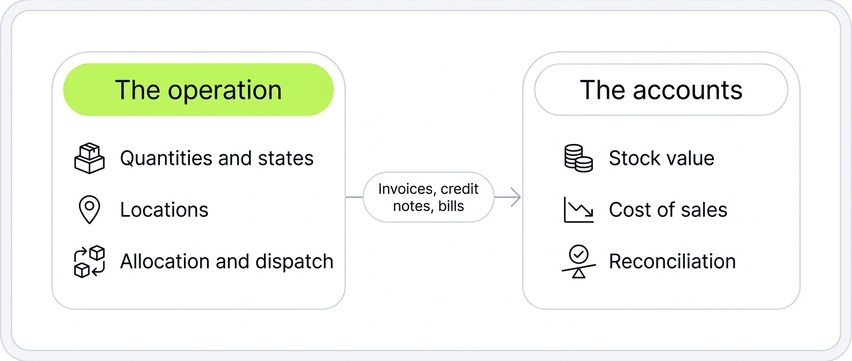
A business that adds an operational system still accounts for stock in Xero. What changes is which system holds the quantities.
The operational system holds the quantities and states, and Xero stops keeping its own. The financial consequences of stock movements reach Xero as documents, sales invoices, credit notes and supplier bills, and stock value and cost of sales reach the ledger by whatever method the operational system provides, whether per transaction or as a periodic journal. How exactly each of those is done varies by system; what doesn't vary is the division: one record for the operation, one for the accounts, with documents carrying the consequences of the first into the second.
The accounts stay a reconcilable ledger, and the stock figure the team works from reflects deliveries and dispatches.
Which record does your business need?
Three questions settle it.
- When a customer asks whether you can supply a quantity by a date, is the answer taken from Xero's quantity on hand? If yes, and the answer is reliable, one record is enough.
- Does anyone keep a stock spreadsheet that the team trusts more than Xero? If yes, the business already has two records, one of them maintained by hand.
- Do orders part-ship, do deliveries arrive before bills, is stock held in more than one place, or does the business make what it sells? Each is a point where the accounting record and the operational one diverge.
The main guide has a fuller checklist of when Xero alone is enough and when it isn't. If the answer here is two records, when to add an inventory app to Xero covers how to weigh the decision and what the different kinds of app are built for.
Where Workhorse sits

Workhorse is the operational record for product businesses on Xero: sales orders, allocation and free-to-sell, goods-in and part-receipts, multiple locations, and components through light production. Xero keeps the accounts.
This is how Workhorse runs the division described above. Items in Xero are set to untracked, so Workhorse is the only stock record and the two systems can't disagree about a quantity. Sales invoices, credit notes and bills are posted to Xero from Workhorse with the right contacts, accounts and tax rates; purchase orders can be sent too, depending on configuration. Cost of goods sold is posted as a month-end journal from a valuation of the period's movements, or per transaction where an in-month balance sheet matters. The Xero integration page sets out what posts where and when, and the main guide covers where Workhorse fits and how the switch runs.
See both records at once
Book a discovery call and bring a recent order. We'll run it through Workhorse, show the stock states as it's allocated and dispatched, and show the invoice arriving in Xero.