

Wholesale & distribution
For product businesses that buy, hold and sell stock — including trade suppliers, importers and distributors — and need fewer steps from order to invoice.

Not every product business fits a neat pattern — and not fitting one doesn’t mean the operation is easy to run. You buy stock, hold it and sell it, through a webstore, over the phone and on trade terms: hundreds of lines, multiple price lists, orders arriving from three directions and containers on the water. What you want from software isn’t more features — it’s fewer steps.
Orders from everywhere
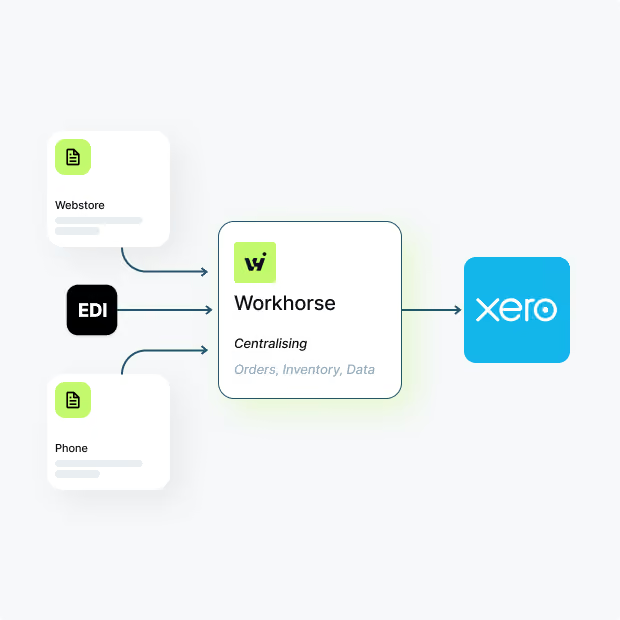
Orders come from a webstore, by email, and from a national chain by EDI. Each arrives in a different shape, and each gets re-keyed — into the stock sheet, then into Xero.
Entering the same order three times is triple the typing and triple the chances of a mistake. The order should be captured once, from wherever it came, and flow through from there.

If your team types the same order into more than one system, this page is for you.
Simple model, constant detail
A marine engine importer sells at trade prices to dealers and retail prices direct. A container lands with most of an order on it. A dealer takes forty units with ten on back order.
If the back-order list is a person’s memory, that’s the gap.
None of this is exotic — it’s Tuesday — but every piece has to be handled without ceremony: the right price applied automatically, the part-delivery booked in, the back order remembered by the system rather than by someone.
When the software is harder than the work
Mainstream inventory apps are built for self-service: you configure the settings, you map the workflows, you train your own team. For a lean team, implementation becomes a project nobody has time to run — so the trial stalls, and the workflow you end up with is the one the app shipped with.

If you’ve trialled an inventory app and quietly gone back to the spreadsheet, you’re not alone.
Order to invoice, one system in the middle
Workhorse connects the ends and keeps the middle simple. Webstore and EDI orders flow in, trade orders are entered once, stock and despatch update as goods move, and invoices sync to Xero — no re-keying anywhere in the chain.

Trade and retail price lists apply themselves, part-deliveries and back orders are standard behaviour, purchasing is raised against suppliers’ lead times and what’s actually selling, and the screens your team sees are the ones they use.

Every Workhorse system starts as the complete platform
quotes, sales orders, stock, purchasing, despatch, invoicing and reporting — and is set up for you in a managed implementation. Functionality you don’t use is hidden. Fields and forms are added to capture the information your business runs on. Reports and PDF documents are written to your formats, and where you need a connection that doesn’t exist yet, we build the integration. The system arrives working — configured by us, not left to you. How that works is set out on our configuration & customisation page.
Most inventory apps leave the setup to you — you configure the settings, build the workflows and train your team. With Workhorse that's our job. We set the system up around how your orders arrive, how your stock moves and how you price, and it arrives working. If your operation is more like bespoke manufacturing, batch production or hire and repairs, those pages cover it.
"The system works well, and the setup/support/training is excellent."
- Owen O'Connor, Technical Director - GVD
.svg)
Read their stories on our customers page
If your operation carries a heavier pattern
bespoke builds, batch obligations or repair and hire fleets — those pages describe it better. And if you hold a handful of products in one place and orders ship complete, Xero alone may genuinely be enough.
If your operation doesn't behave quite like anything on these pages
That's often the strongest sign you're in the right place. Show us how orders reach you and how stock leaves, however unusual the route, and we'll show you each piece landing in one system, with stock staying right and Xero updated at the end.